

Google Ads Data Manager: Building More Reliable Marketing Data Pipelines with First-Party Data
Discover how Google Ads Data Manager helps unify CRM data, offline conversions, and customer insights to build more reliable marketing data pipelines.

Monika Boldak
Associate Director, Marketing
Connecting Data Analysis and Marketing Strategies
Marketing teams have become increasingly sophisticated in how they collect and analyze data, yet many organizations still struggle to connect marketing performance to actual business outcomes.
Google Ads may report hundreds of conversions, while the CRM shows a different number of qualified leads and the sales team tracks revenue in another system entirely. None of these numbers are necessarily wrong, but they often tell only part of the story.
As organizations invest more heavily in first-party data and AI-powered advertising, the ability to connect customer and conversion data across systems has become increasingly important. This is where Google Ads Data Manager comes in.
What Is Google Ads Data Manager?
Google Ads Data Manager is a framework that helps organizations connect first-party business data with Google's advertising platforms.
Rather than relying on manual uploads and disconnected workflows, Data Manager creates a more structured way to share information between systems such as CRM platforms, ecommerce platforms, analytics tools, customer databases, and Google Ads.
The value of this approach becomes clear when you consider how customers actually move through a buying journey. A user may click an ad today, submit a lead form tomorrow, speak with a sales representative next week, and become a customer a month later. While each stage of that journey may be captured somewhere, it is often not connected back to the advertising platform that generated the original opportunity.
Google Ads Data Manager helps bridge that gap by making downstream business outcomes available for reporting, audience building, and campaign optimization.
Connecting Marketing Data Across Systems

How Google Ads Data Manager Works
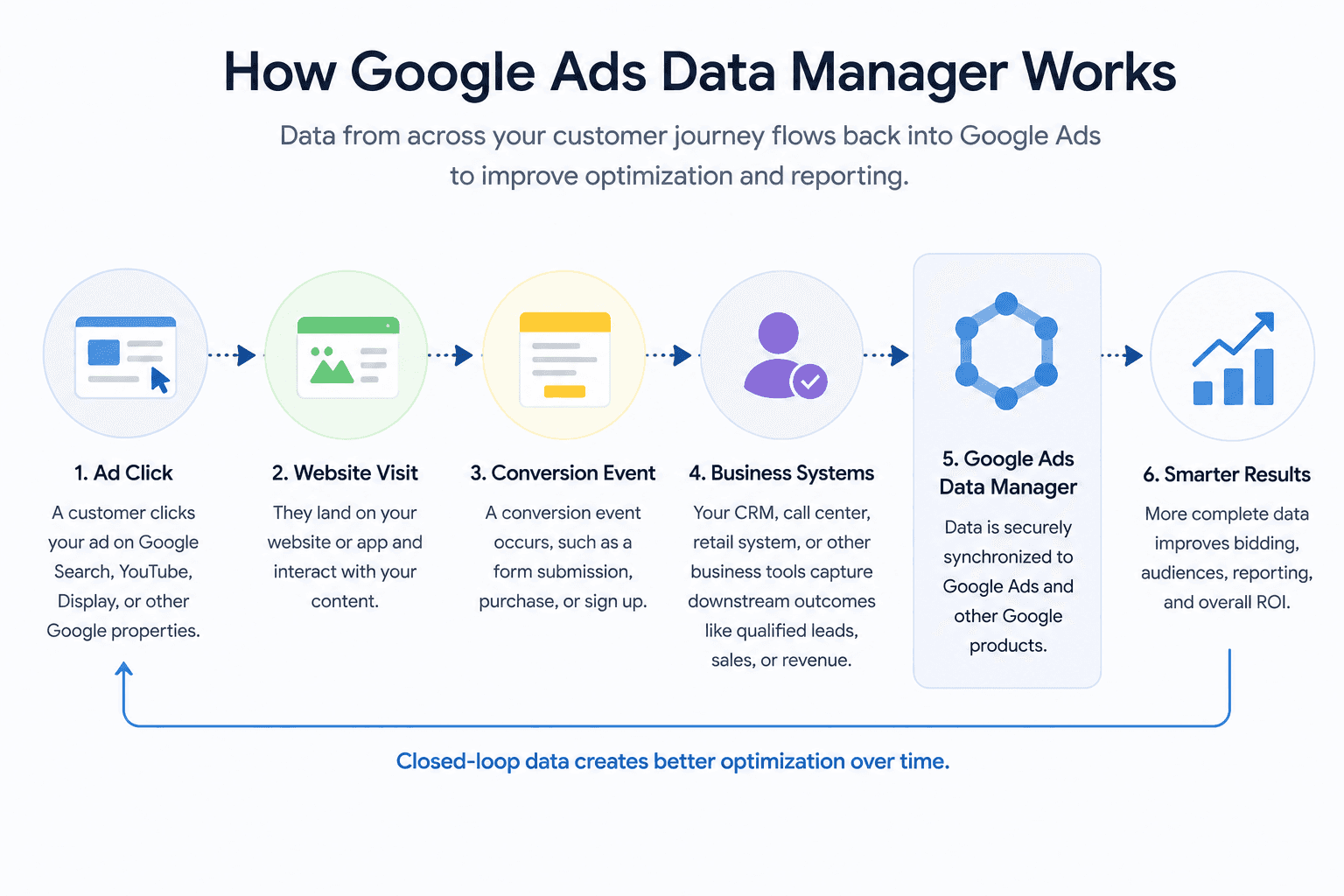
At a high level, Data Manager helps connect customer outcomes with advertising activity.
A customer clicks an advertisement and visits a website. Their interactions are captured through analytics and advertising platforms, while business systems continue tracking what happens after the initial visit. Leads may be qualified, appointments booked, sales completed, or subscriptions activated.
Google Ads Data Manager helps make those outcomes available to Google's advertising ecosystem, allowing campaigns to optimize toward business results rather than simply website activity.
For many organizations, this means moving beyond measuring form submissions and purchases alone. Instead, they can begin incorporating qualified leads, revenue values, customer lifetime value, and other meaningful business metrics into their optimization strategies.
Manual Uploads vs Automated Data Pipelines
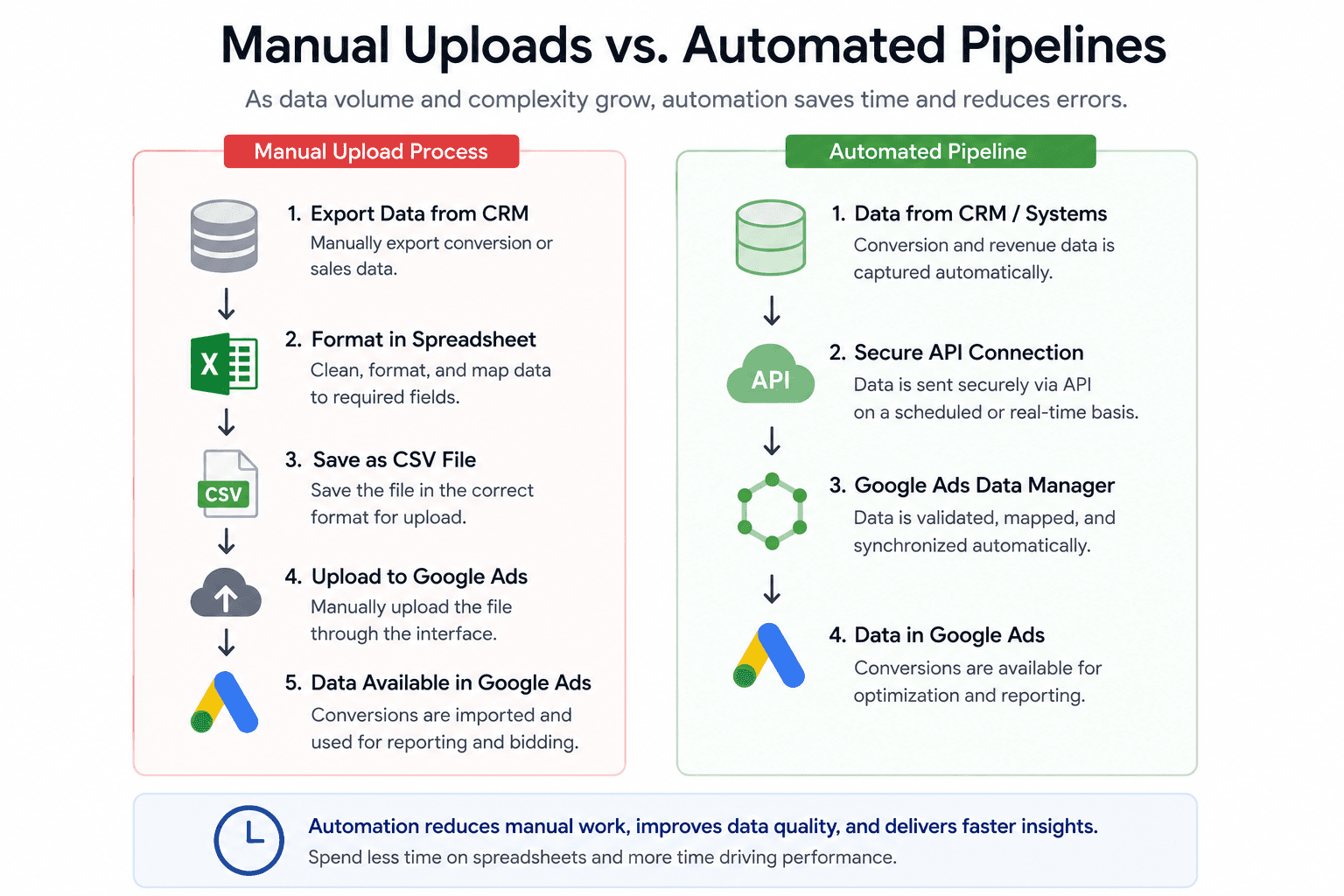
Many organizations begin by importing offline conversions manually. This can be an effective approach for validating processes and supporting lower conversion volumes.
As businesses grow, however, manual workflows often become difficult to maintain. More systems become involved, reporting requirements increase, and teams spend valuable time preparing files and validating uploads.
Automated data pipelines help reduce this operational burden by moving information directly between systems. Instead of relying on spreadsheets and scheduled uploads, organizations can create a more reliable flow of customer and conversion data into Google Ads.
The decision to automate is rarely about technology alone. More often, it is driven by the need for consistency, scalability, and confidence in reporting.
Google Ads Data Manager vs Offline Conversion Imports and Enhanced Conversions
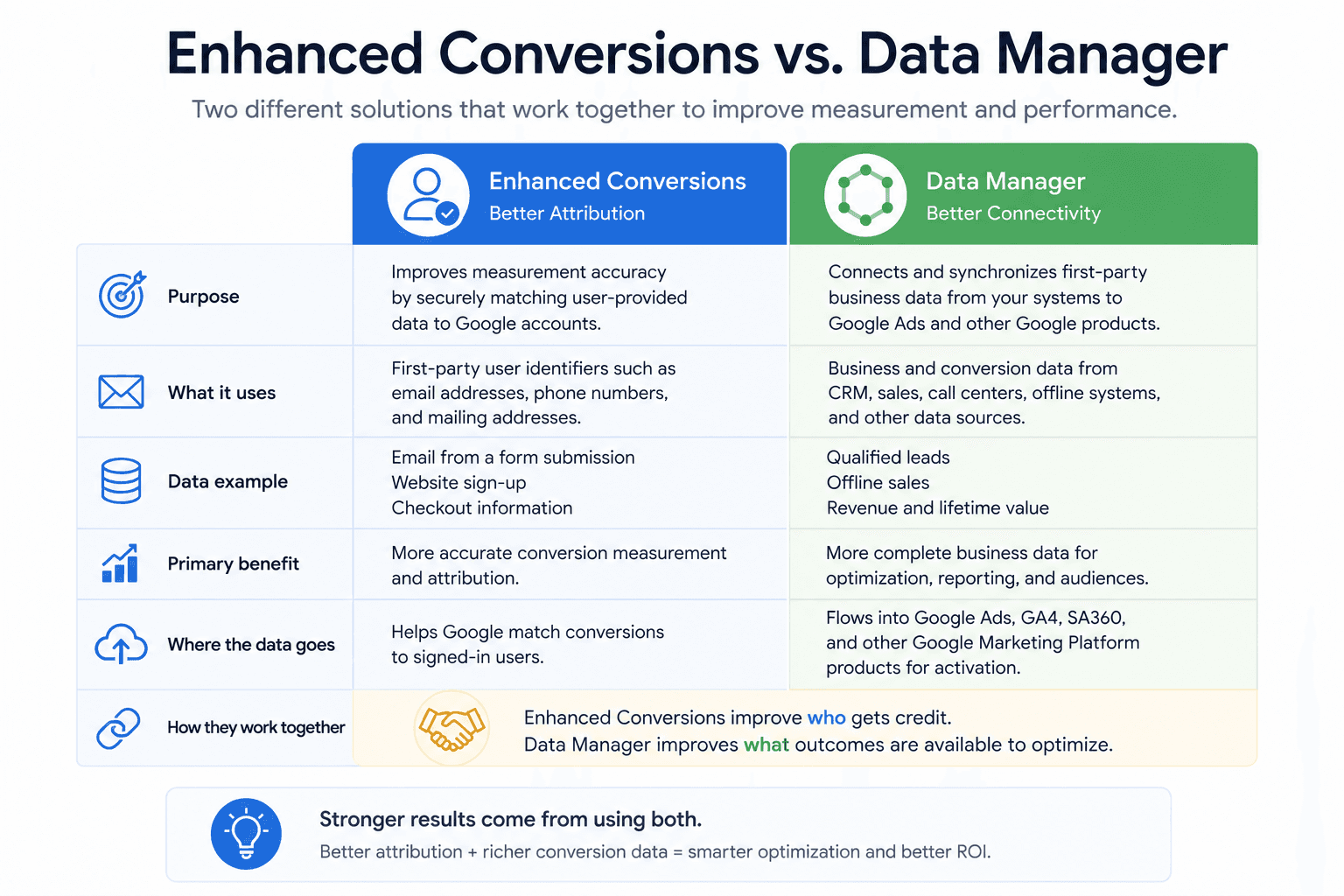
Google Ads Data Manager is often confused with Offline Conversion Imports and Enhanced Conversions, but each serves a different purpose.
Offline Conversion Imports allow organizations to upload business outcomes such as qualified leads, closed opportunities, or offline sales into Google Ads. Enhanced Conversions improve attribution by using consented first-party identifiers, such as email addresses and phone numbers, to better connect conversions with advertising interactions.
Google Ads Data Manager takes a broader approach by helping organizations create scalable connections between business systems and Google's advertising platforms. Rather than focusing on individual uploads or attribution improvements, it helps synchronize customer and conversion data across multiple sources.
In simple terms, Enhanced Conversions help Google understand who converted, Offline Conversion Imports help Google understand what converted, and Data Manager helps connect the systems that make that information available for optimization and reporting.
These solutions often work best together as part of a broader measurement strategy.
When Does the Data Manager API Make Sense?
Google provides two primary ways to work with Data Manager.
The first uses the Google Ads interface, where approved data sources can be connected through a guided setup process. This approach works well for many organizations that want to improve data connectivity without extensive development work.
The second approach uses the Data Manager API. This allows organizations to programmatically send data into Google Ads and other Google Marketing Platform products.
The API is often preferred when businesses require custom integrations, automated workflows, or deeper integration with platforms such as Salesforce, HubSpot, Shopify, BigQuery, Snowflake, and customer data platforms.
While API implementations require additional planning, they can provide greater flexibility and scalability as data requirements evolve.
Common Implementation Challenges
The technology itself is often the easiest part of a Data Manager implementation.
More commonly, organizations struggle with data quality and governance challenges. Customer identifiers may differ between systems, conversion definitions may vary across departments, and ownership of reporting processes may not be clearly established.
Successful implementations typically begin with alignment. Before connecting systems, organizations should ensure they agree on what constitutes a lead, opportunity, conversion, or sale and how those outcomes should be measured.
Without that foundation, even the most sophisticated integration can produce reporting that stakeholders struggle to trust.
A Real-World Example
The value of better data connectivity becomes particularly clear when important customer interactions occur outside digital channels.
For example, we worked with a telecommunications organization where a significant portion of purchases happened through retail locations, partner stores, and inbound call centres. While these outcomes were being captured internally, they were not consistently available within Google Ads, limiting the platform's ability to optimize toward the conversions that mattered most to the business.
By improving the flow of downstream conversion data into Google Ads, the organization was able to support more effective value-based bidding and audience strategies. The result was an 81 percent reduction in cost per conversion and nearly four times more revenue while maintaining the same advertising budget.
The biggest change wasn't the volume of data being collected. It was ensuring that the data already available across the business could be used more effectively for advertising optimization and decision-making.
Final Thoughts
Google Ads Data Manager is designed to help organizations connect customer and conversion data across systems so that advertising platforms have a more complete understanding of business performance.
As marketing teams continue investing in first-party data, automation, and AI-driven optimization, reliable data connectivity is becoming increasingly important. Organizations that can successfully connect CRM data, offline conversions, revenue information, and advertising platforms are better positioned to improve reporting, support smarter bidding strategies, and make more informed business decisions.
The goal is not to make every platform report identical numbers. The goal is to create a more complete and reliable view of customer value that can be used to improve marketing performance over time.
More Insights
Understanding the IAB TCF v2.3 Update: New Vendor Disclosure Requirements Explained

Rob English
Director, Data Solutions
Jun 17, 2026
Read More
How to Choose the Right ETL Tool for Your Data Pipeline

Cem Bakar
Cloud Architect
Jun 10, 2026
Read More
CM360 Path to Conversion Reporting: Full Customer Journey Attribution
Monika Boldak
Associate Director, Marketing
Jun 3, 2026
Read More
More Insights
Sign Up For Our Newsletter

Napkyn Inc.
204-78 George Street, Ottawa, Ontario, K1N 5W1, Canada
Napkyn US
6 East 32nd Street, 9th Floor, New York, NY 10016, USA
212-247-0800 | info@napkyn.com


Google Ads Data Manager: Building More Reliable Marketing Data Pipelines with First-Party Data
Discover how Google Ads Data Manager helps unify CRM data, offline conversions, and customer insights to build more reliable marketing data pipelines.
Monika Boldak
Associate Director, Marketing
July 8, 2026
Connecting Data Analysis and Marketing Strategies
Marketing teams have become increasingly sophisticated in how they collect and analyze data, yet many organizations still struggle to connect marketing performance to actual business outcomes.
Google Ads may report hundreds of conversions, while the CRM shows a different number of qualified leads and the sales team tracks revenue in another system entirely. None of these numbers are necessarily wrong, but they often tell only part of the story.
As organizations invest more heavily in first-party data and AI-powered advertising, the ability to connect customer and conversion data across systems has become increasingly important. This is where Google Ads Data Manager comes in.
What Is Google Ads Data Manager?
Google Ads Data Manager is a framework that helps organizations connect first-party business data with Google's advertising platforms.
Rather than relying on manual uploads and disconnected workflows, Data Manager creates a more structured way to share information between systems such as CRM platforms, ecommerce platforms, analytics tools, customer databases, and Google Ads.
The value of this approach becomes clear when you consider how customers actually move through a buying journey. A user may click an ad today, submit a lead form tomorrow, speak with a sales representative next week, and become a customer a month later. While each stage of that journey may be captured somewhere, it is often not connected back to the advertising platform that generated the original opportunity.
Google Ads Data Manager helps bridge that gap by making downstream business outcomes available for reporting, audience building, and campaign optimization.
Connecting Marketing Data Across Systems
How Google Ads Data Manager Works
At a high level, Data Manager helps connect customer outcomes with advertising activity.
A customer clicks an advertisement and visits a website. Their interactions are captured through analytics and advertising platforms, while business systems continue tracking what happens after the initial visit. Leads may be qualified, appointments booked, sales completed, or subscriptions activated.
Google Ads Data Manager helps make those outcomes available to Google's advertising ecosystem, allowing campaigns to optimize toward business results rather than simply website activity.
For many organizations, this means moving beyond measuring form submissions and purchases alone. Instead, they can begin incorporating qualified leads, revenue values, customer lifetime value, and other meaningful business metrics into their optimization strategies.
Manual Uploads vs Automated Data Pipelines
Many organizations begin by importing offline conversions manually. This can be an effective approach for validating processes and supporting lower conversion volumes.
As businesses grow, however, manual workflows often become difficult to maintain. More systems become involved, reporting requirements increase, and teams spend valuable time preparing files and validating uploads.
Automated data pipelines help reduce this operational burden by moving information directly between systems. Instead of relying on spreadsheets and scheduled uploads, organizations can create a more reliable flow of customer and conversion data into Google Ads.
The decision to automate is rarely about technology alone. More often, it is driven by the need for consistency, scalability, and confidence in reporting.
Google Ads Data Manager vs Offline Conversion Imports and Enhanced Conversions
Google Ads Data Manager is often confused with Offline Conversion Imports and Enhanced Conversions, but each serves a different purpose.
Offline Conversion Imports allow organizations to upload business outcomes such as qualified leads, closed opportunities, or offline sales into Google Ads. Enhanced Conversions improve attribution by using consented first-party identifiers, such as email addresses and phone numbers, to better connect conversions with advertising interactions.
Google Ads Data Manager takes a broader approach by helping organizations create scalable connections between business systems and Google's advertising platforms. Rather than focusing on individual uploads or attribution improvements, it helps synchronize customer and conversion data across multiple sources.
In simple terms, Enhanced Conversions help Google understand who converted, Offline Conversion Imports help Google understand what converted, and Data Manager helps connect the systems that make that information available for optimization and reporting.
These solutions often work best together as part of a broader measurement strategy.
When Does the Data Manager API Make Sense?
Google provides two primary ways to work with Data Manager.
The first uses the Google Ads interface, where approved data sources can be connected through a guided setup process. This approach works well for many organizations that want to improve data connectivity without extensive development work.
The second approach uses the Data Manager API. This allows organizations to programmatically send data into Google Ads and other Google Marketing Platform products.
The API is often preferred when businesses require custom integrations, automated workflows, or deeper integration with platforms such as Salesforce, HubSpot, Shopify, BigQuery, Snowflake, and customer data platforms.
While API implementations require additional planning, they can provide greater flexibility and scalability as data requirements evolve.
Common Implementation Challenges
The technology itself is often the easiest part of a Data Manager implementation.
More commonly, organizations struggle with data quality and governance challenges. Customer identifiers may differ between systems, conversion definitions may vary across departments, and ownership of reporting processes may not be clearly established.
Successful implementations typically begin with alignment. Before connecting systems, organizations should ensure they agree on what constitutes a lead, opportunity, conversion, or sale and how those outcomes should be measured.
Without that foundation, even the most sophisticated integration can produce reporting that stakeholders struggle to trust.
A Real-World Example
The value of better data connectivity becomes particularly clear when important customer interactions occur outside digital channels.
For example, we worked with a telecommunications organization where a significant portion of purchases happened through retail locations, partner stores, and inbound call centres. While these outcomes were being captured internally, they were not consistently available within Google Ads, limiting the platform's ability to optimize toward the conversions that mattered most to the business.
By improving the flow of downstream conversion data into Google Ads, the organization was able to support more effective value-based bidding and audience strategies. The result was an 81 percent reduction in cost per conversion and nearly four times more revenue while maintaining the same advertising budget.
The biggest change wasn't the volume of data being collected. It was ensuring that the data already available across the business could be used more effectively for advertising optimization and decision-making.
Final Thoughts
Google Ads Data Manager is designed to help organizations connect customer and conversion data across systems so that advertising platforms have a more complete understanding of business performance.
As marketing teams continue investing in first-party data, automation, and AI-driven optimization, reliable data connectivity is becoming increasingly important. Organizations that can successfully connect CRM data, offline conversions, revenue information, and advertising platforms are better positioned to improve reporting, support smarter bidding strategies, and make more informed business decisions.
The goal is not to make every platform report identical numbers. The goal is to create a more complete and reliable view of customer value that can be used to improve marketing performance over time.
More Insights

The Most Durable AI Investment: A Strong Data Foundation

Jasmine Libert
Senior VP Growth and GTM
Sep 28, 2026
Read More

How to Detect Google Analytics Tracking Issues Early with Automated QA

Skylar van Dalen-Flude
Senior Data Analyst
Aug 26, 2026
Read More

Why GA4, Google Ads, and BigQuery Numbers Don’t Match

Chris Wright
Associate Director, Training and Development
Jul 15, 2026
Read More
More Insights
Sign Up For Our Newsletter