
Using Generative AI in BigQuery to Analyze GA4 Data at Scale
Unlock deeper insights from GA4 with Generative AI in BigQuery. Learn how to analyze multilingual feedback, summarize page performance, and apply NLP tasks using SQL—no external tools required.

Shreya Banker
Data Scientist
Data Analyst enthusiast. More than 7 years of exposure in Data Analysis and Software programming. I am a highly motivated, versatile IT professional with experience in Data Analysis, Visualization and Database Management. I look for the hardest problem to solve and where I can learn and develop the most. I love a challenge and never run from a difficult task. I'm determined to succeed, and I look forward to what life has to offer.
Google Analytics (GA4) has revolutionized digital analytics with its event-based data model, flexible schema, and seamless integration with BigQuery. But for many teams, one major challenge remains:
How do you analyze unstructured data like customer feedback, search terms, or multilingual inputs at scale?
You can analyze unstructured GA4 data directly in BigQuery using generative AI. With AI.GENERATE() and Vertex AI models, teams can translate, classify, score sentiment, and summarize text-based data using SQL, without external tools or pipelines.
Why This Was Difficult Before
Traditionally, this required:
Exporting data from BigQuery
Using external NLP libraries or APIs (like Google Cloud Translation or sentiment scoring)
Writing complex Python scripts or custom pipelines
This created three key challenges:
Slow analysis cycles
Heavy reliance on engineering teams
Disconnected analytics workflows
What Changed: Generative AI in BigQuery
With BigQuery’s built-in support for Vertex AI models via AI.GENERATE(), you can now analyze unstructured GA4 data directly within SQL.
This includes:
Translation
Topic classification
Sentiment analysis
Summarization
All within your existing GA4 → BigQuery pipeline.
Read More —>> Ready for What? AI Readiness in Marketing Today
Use Case: Analyzing Multilingual Feedback from GA4
Let’s say you’ve implemented a GA4 custom event called nps_feedback, which captures open-text user feedback via an event parameter named feedback.
The challenges:
Feedback is unstructured and difficult to analyze
Responses come in multiple languages
Data cannot be easily used for reporting or segmentation
Step 1: Export GA4 to BigQuery
Exporting GA4 data to BigQuery provides access to raw, event-level data, including feedback across all users and sessions. (Prerequisite)
Read More —>> How to Use BigQuery to Get Powerful Marketing Insights from Google Marketing Products and First-Party Data
Step 2: Structure the Feedback Data
Before applying AI, feedback data should be organized into a structured table where each row represents a feedback event.
This enables:
Consistent querying
Scalable enrichment
Reliable downstream analysis
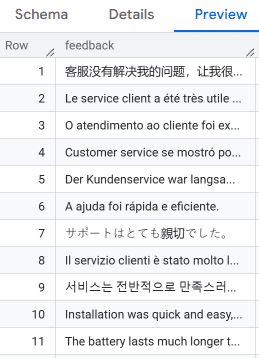
Step 3: Use AI.GENERATE() to Enrich the Feedback
This is where generative AI transforms GA4 data.
Using Gemini models inside BigQuery, you can convert unstructured feedback into structured fields that can be used across analytics and reporting.
You are turning text into measurable data.
WITH ai_function_feedback AS (
SELECT
feedback AS original_feedback,
AI.GENERATE(
CONCAT(
'Translate this feedback to English if not already in English. ',
'Identify if it is about customer service and provide a positivity score. Text: ', feedback
),
connection_id => 'us-central1.vertex_ai_conn',
endpoint => 'gemini-2.0-flash',
model_params => JSON '{"temperature": 0}',
output_schema => 'englishreview STRING, is_about_service BOOL, positivity_score FLOAT64'
) AS Englishreview
FROM `your_project.your_dataset.feedback_table`
)
SELECT
original_feedback,
Englishreview.englishreview,
Englishreview.is_about_service,
Englishreview.positivity_score
FROM ai_function_feedback;
Step 4: Output Example
You now have structured outputs:
Translated feedback
Topic classification (e.g., customer service)
Sentiment score (
positivity_score)
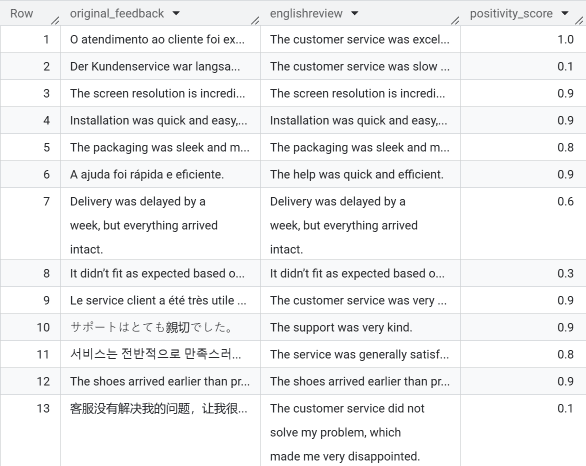
Now you can use these columns to:
Identify negative user experiences at scale
Segment users based on sentiment
Track customer experience trends over time
Feed enriched data into dashboards and models
How Generative AI Improves GA4 Analysis
GA4 tells you what users are doing (page views, clicks, sessions) but without context, behavior is just numbers. By integrating Generative AI, you can transform unstructured inputs into meaningful, structured insights.
Challenge | How Generative AI Helps |
Unstructured, multilingual feedback | Translate and normalize directly within SQL |
Subjective sentiment | Generate a standardized |
Hard to categorize feedback | Automatically classify using an |
Manual analysis is slow and labor-intensive | Automate at scale |
From Data to Insight
Generative AI bridges the gap between behavioral data and customer context, enabling a shift from:
Reporting → Insight generation
Data collection → Decision-making
This is a key step toward AI-driven measurement strategies.
Use Case: AI-Summarized Page Performance in GA4
Another high-impact use case is summarizing page-level performance. In this use case, we utilized AI.GENERATE() to automatically summarize user engagement for each GA4 page_path. By combining quantitative metrics like pageviews and average session duration, the model generates concise, human-readable descriptions of page performance. Additionally, it assigns a performance label (e.g., High, Low) to help quickly identify content that requires attention or optimization
Using AI.GENERATE(), you can combine metrics such as:
Pageviews
Engagement time
Session behavior
And generate:
Human-readable summaries
Performance labels (High, Medium, Low)
This approach enables:
Faster content performance audits
Scalable page-level insights
Smarter dashboard annotations - all with SQL and no external processing.

All of this is generated directly within BigQuery using SQL. No external tools. No additional pipelines.
Read More —>> Google Ads and Analytics AI Agents: Smarter Marketing or Risky Move?
Data Quality, Validation, and Workflow Integration
AI outputs are only as reliable as the underlying GA4 data. To generate meaningful and trustworthy insights, organizations need a strong data foundation built on clean event tracking, consistent naming conventions, and well-structured, validated BigQuery pipelines.
At the same time, generative AI should enhance analysis, not replace it. Outputs still require human oversight to ensure they are accurate, aligned with business logic, and consistent with internal definitions and governance standards.
The real value comes when AI is embedded into existing workflows. This includes integrating AI-driven insights into reporting environments, aligning them with marketing decision-making processes, and incorporating them directly into data pipelines so insights can be generated and acted on at scale.
Conclusion
Generative AI in BigQuery transforms GA4 from raw data into rich, human-readable insights: all with SQL. Whether you're analyzing multilingual feedback or summarizing page performance, AI.GENERATE() removes the need for external tools, speeds up analysis, and unlocks smarter decision-making directly within your data pipeline.
More Insights

Understanding the IAB TCF v2.3 Update: New Vendor Disclosure Requirements Explained

Rob English
Director, Data Solutions
Jun 17, 2026
Read More

How to Choose the Right ETL Tool for Your Data Pipeline

Cem Bakar
Cloud Architect
Jun 10, 2026
Read More

CM360 Path to Conversion Reporting: Full Customer Journey Attribution

Monika Boldak
Associate Director, Marketing
Jun 3, 2026
Read More
More Insights
Sign Up For Our Newsletter

Napkyn Inc.
204-78 George Street, Ottawa, Ontario, K1N 5W1, Canada
Napkyn US
6 East 32nd Street, 9th Floor, New York, NY 10016, USA
212-247-0800 | info@napkyn.com


Using Generative AI in BigQuery to Analyze GA4 Data at Scale
Unlock deeper insights from GA4 with Generative AI in BigQuery. Learn how to analyze multilingual feedback, summarize page performance, and apply NLP tasks using SQL—no external tools required.
Shreya Banker
Data Scientist
August 13, 2025
Data Analyst enthusiast. More than 7 years of exposure in Data Analysis and Software programming. I am a highly motivated, versatile IT professional with experience in Data Analysis, Visualization and Database Management. I look for the hardest problem to solve and where I can learn and develop the most. I love a challenge and never run from a difficult task. I'm determined to succeed, and I look forward to what life has to offer.
Google Analytics (GA4) has revolutionized digital analytics with its event-based data model, flexible schema, and seamless integration with BigQuery. But for many teams, one major challenge remains:
How do you analyze unstructured data like customer feedback, search terms, or multilingual inputs at scale?
You can analyze unstructured GA4 data directly in BigQuery using generative AI. With AI.GENERATE() and Vertex AI models, teams can translate, classify, score sentiment, and summarize text-based data using SQL, without external tools or pipelines.
Why This Was Difficult Before
Traditionally, this required:
Exporting data from BigQuery
Using external NLP libraries or APIs (like Google Cloud Translation or sentiment scoring)
Writing complex Python scripts or custom pipelines
This created three key challenges:
Slow analysis cycles
Heavy reliance on engineering teams
Disconnected analytics workflows
What Changed: Generative AI in BigQuery
With BigQuery’s built-in support for Vertex AI models via AI.GENERATE(), you can now analyze unstructured GA4 data directly within SQL.
This includes:
Translation
Topic classification
Sentiment analysis
Summarization
All within your existing GA4 → BigQuery pipeline.
Read More —>> Ready for What? AI Readiness in Marketing Today
Use Case: Analyzing Multilingual Feedback from GA4
Let’s say you’ve implemented a GA4 custom event called nps_feedback, which captures open-text user feedback via an event parameter named feedback.
The challenges:
Feedback is unstructured and difficult to analyze
Responses come in multiple languages
Data cannot be easily used for reporting or segmentation
Step 1: Export GA4 to BigQuery
Exporting GA4 data to BigQuery provides access to raw, event-level data, including feedback across all users and sessions. (Prerequisite)
Read More —>> How to Use BigQuery to Get Powerful Marketing Insights from Google Marketing Products and First-Party Data
Step 2: Structure the Feedback Data
Before applying AI, feedback data should be organized into a structured table where each row represents a feedback event.
This enables:
Consistent querying
Scalable enrichment
Reliable downstream analysis
Step 3: Use AI.GENERATE() to Enrich the Feedback
This is where generative AI transforms GA4 data.
Using Gemini models inside BigQuery, you can convert unstructured feedback into structured fields that can be used across analytics and reporting.
You are turning text into measurable data.
WITH ai_function_feedback AS (
SELECT
feedback AS original_feedback,
AI.GENERATE(
CONCAT(
'Translate this feedback to English if not already in English. ',
'Identify if it is about customer service and provide a positivity score. Text: ', feedback
),
connection_id => 'us-central1.vertex_ai_conn',
endpoint => 'gemini-2.0-flash',
model_params => JSON '{"temperature": 0}',
output_schema => 'englishreview STRING, is_about_service BOOL, positivity_score FLOAT64'
) AS Englishreview
FROM `your_project.your_dataset.feedback_table`
)
SELECT
original_feedback,
Englishreview.englishreview,
Englishreview.is_about_service,
Englishreview.positivity_score
FROM ai_function_feedback;
Step 4: Output Example
You now have structured outputs:
Translated feedback
Topic classification (e.g., customer service)
Sentiment score (
positivity_score)
Now you can use these columns to:
Identify negative user experiences at scale
Segment users based on sentiment
Track customer experience trends over time
Feed enriched data into dashboards and models
How Generative AI Improves GA4 Analysis
GA4 tells you what users are doing (page views, clicks, sessions) but without context, behavior is just numbers. By integrating Generative AI, you can transform unstructured inputs into meaningful, structured insights.
Challenge | How Generative AI Helps |
Unstructured, multilingual feedback | Translate and normalize directly within SQL |
Subjective sentiment | Generate a standardized |
Hard to categorize feedback | Automatically classify using an |
Manual analysis is slow and labor-intensive | Automate at scale |
From Data to Insight
Generative AI bridges the gap between behavioral data and customer context, enabling a shift from:
Reporting → Insight generation
Data collection → Decision-making
This is a key step toward AI-driven measurement strategies.
Use Case: AI-Summarized Page Performance in GA4
Another high-impact use case is summarizing page-level performance. In this use case, we utilized AI.GENERATE() to automatically summarize user engagement for each GA4 page_path. By combining quantitative metrics like pageviews and average session duration, the model generates concise, human-readable descriptions of page performance. Additionally, it assigns a performance label (e.g., High, Low) to help quickly identify content that requires attention or optimization
Using AI.GENERATE(), you can combine metrics such as:
Pageviews
Engagement time
Session behavior
And generate:
Human-readable summaries
Performance labels (High, Medium, Low)
This approach enables:
Faster content performance audits
Scalable page-level insights
Smarter dashboard annotations - all with SQL and no external processing.
All of this is generated directly within BigQuery using SQL. No external tools. No additional pipelines.
Read More —>> Google Ads and Analytics AI Agents: Smarter Marketing or Risky Move?
Data Quality, Validation, and Workflow Integration
AI outputs are only as reliable as the underlying GA4 data. To generate meaningful and trustworthy insights, organizations need a strong data foundation built on clean event tracking, consistent naming conventions, and well-structured, validated BigQuery pipelines.
At the same time, generative AI should enhance analysis, not replace it. Outputs still require human oversight to ensure they are accurate, aligned with business logic, and consistent with internal definitions and governance standards.
The real value comes when AI is embedded into existing workflows. This includes integrating AI-driven insights into reporting environments, aligning them with marketing decision-making processes, and incorporating them directly into data pipelines so insights can be generated and acted on at scale.
Conclusion
Generative AI in BigQuery transforms GA4 from raw data into rich, human-readable insights: all with SQL. Whether you're analyzing multilingual feedback or summarizing page performance, AI.GENERATE() removes the need for external tools, speeds up analysis, and unlocks smarter decision-making directly within your data pipeline.
More Insights

The Most Durable AI Investment: A Strong Data Foundation

Jasmine Libert
Senior VP Growth and GTM
Sep 28, 2026
Read More

How to Detect Google Analytics Tracking Issues Early with Automated QA

Skylar van Dalen-Flude
Senior Data Analyst
Aug 26, 2026
Read More

Why GA4, Google Ads, and BigQuery Numbers Don’t Match

Chris Wright
Associate Director, Training and Development
Jul 15, 2026
Read More
More Insights
Sign Up For Our Newsletter